
Address Verification
The Address Verification feature on the Intake Page is there to ensure that all address information is true and accurate. This tool compares the information you've entered to Google Maps and connects it to the matching verified address. Follow these instructions to verify an address.
1. Begin entering the address in the Adress 1 field box on the Intake Page
Note: The Address 1, City, State, and Zip fields will become red, bold and with asterisks, indicating they are mandatory fields. Agencies who have Address Verification fields set as mandatory fields will not be able to conduct assessments or assign services if any of the mandatory fields are unsatisfied.
2. Continue entering the address information into the required fields boxes
3. When you are finished, the Address Verification overlay will appear
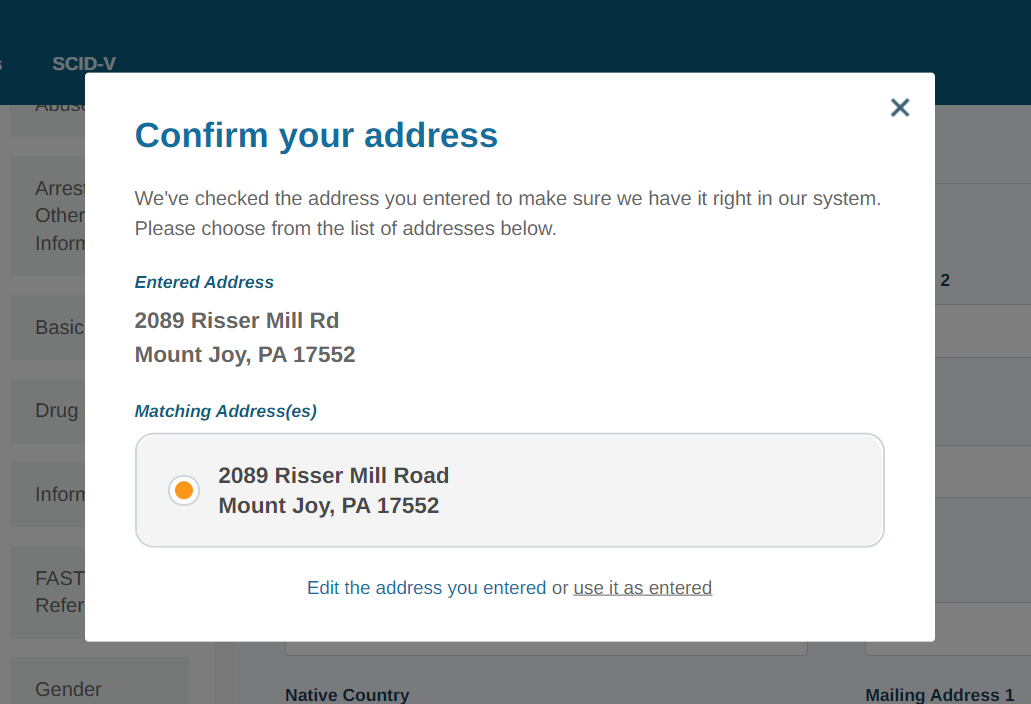
4. If the address under Matching Address(es) is correct, click on the address to select it and you have successfully verified the address
5. If the Matching Address(es) is not correct or there are no Matching Addresses, click "Edit the address you entered"
6. The screen overlay will disappear, allowing you to make edits to the address fields
7. When you are finished making your edits, the Address Verification overlay will appear again
8. If the Matching Address(es) is still incorrect or there are still no Matching Addresses, you may need to verify the address again with your client.
Note: In some cases, such as in rural areas or with new constructions, addresss may not to be verifiable. In such cases, it is acceptable to click "use it as entered" in the Address Verification overlay. This will allow you to bypass the verification.
What about individuals with no address?
We have hardcoded intake options for individuals who do not have an address to verify. Each of these options should be entered into the Address 1 field and will not work if they are spelled incorrectly. This will allow you to bypass the Address Verification.
- Homeless
- None
- N/A
- Not Applicable
- Lives in car
- Lives in a car
- Shelter
- No Address
Comments
0 comments
Please sign in to leave a comment.